11 frequently asked questions about Gestware Cloud, the invoicing and management software for SMBs.
Where do I do the bank reconciliation?
Management → Treasury → Reconciliations → New reconciliation. You can also use the ✓ (New reconciliation) button on the account row, in Management → Treasury → Accounts: it creates a reconciliation for that account and opens the detail.
What is bank reconciliation for?
It matches the bank statement movements against the movements the program recorded for that account (receipts and self-assessed documents), mapping each statement line to the matching movement(s) and confirming everything ties out.
How do I create a reconciliation?
Click New reconciliation, pick the account and, if you want, adjust the period and bank balance. The period is suggested (the one following the account's last reconciliation) and cannot overlap other reconciliations of the same account.
How do I import the bank movements?
In the reconciliation detail, use Import movements: upload an .xlsx or .csv with three columns exported from online banking, or type the lines by hand in a table. There is a button to download the template.
Which columns must the import file have?
Three columns, in this order: date, amount and description; the first row can be a header. Dates accept the DD/MM/YYYY format and the amount accepts comma or dot as the decimal separator. A positive amount is an inflow (receipt) and a negative one is an outflow (payment).
Does the program match the statement movements automatically?
Yes. On import, each line is automatically linked to the account movement with the same amount (using the date to break ties) whenever the match is unambiguous. The rest are left to map manually.
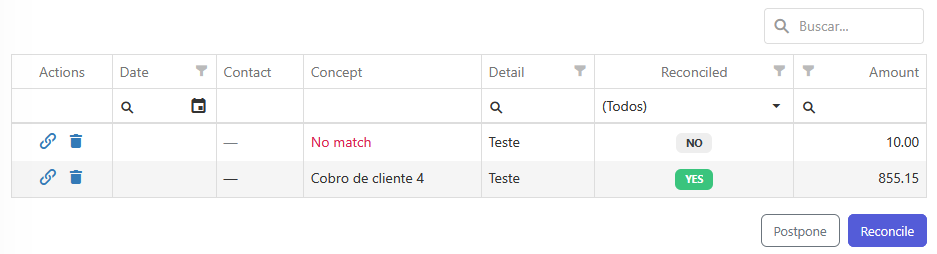
The program suggests the match when it finds one; the red “No match” line is the one you will have to link by hand.
Can I reconcile several account movements to one statement line?
Yes. In the mapping window you can select several movements (checkboxes); the selected total should equal the statement line amount (a green check appears when it matches).
What does 'Reconciled' mean on a line?
It means the statement line has at least one program movement mapped to it. Until it has a match, it shows 'No match'.
The Reconciled column tags every line YES or NO, and you can filter by it. Click the image to enlarge it.
What is the difference between Reconcile and Postpone?
Reconcile finalizes the reconciliation and marks the mapped movements as reconciled on the account (they become 'Yes' on the account movements page). Postpone saves the work to resume later, without finalizing.
The two buttons at the foot of the grid: Reconcile closes the selected lines, Postpone leaves them for later.
What are the Previous balance and the Difference?
The Previous balance carries the closing balance of the prior period (the account's initial amount plus the lines of earlier reconciliations). The Total balance is the Previous balance plus Receipts and Payments, and the Difference is the declared Bank balance minus the Total balance (it reaches zero, with a green check, when everything is reconciled).
If I delete a reconciliation, what happens to the movements?
The movements that reconciliation had reconciled go back to not reconciled and become available to reconcile in another reconciliation.